I have seen a lot of dashboards in my career.
Some of them were genuinely impressive: beautiful charts, dozens of metrics, color-coded indicators everywhere. The kind of showcase that looks fantastic in a demo and earns applause in the meeting where it gets unveiled.
And then nobody uses them.
I will be honest: early in my career, I was guilty of this too. I built dashboards I was proud of. They were clean, thorough, and technically solid. Looking back, some of them sat untouched shortly after launch. At the time I did not fully understand why. Now I do.
That is not an exaggeration. I have watched engineering and BI teams spend weeks, sometimes months, building dashboards that quietly collect digital dust. Meanwhile, the very stakeholders who approved the project continue running decisions off personal spreadsheets or asking the data team for ad hoc SQL pulls every other week.
If this sounds familiar, you are not alone. It happens not because people lack technical skill in Tableau, Power BI, or Looker. It happens because most dashboards are engineered to look useful rather than to actually be useful.
The Problem With Most Dashboards
The most common failure mode is building dashboards around data availability rather than decision-making workflows.
Here is what happens in practice: a stakeholder asks for a dashboard. The data team checks what tables exist in the warehouse. They build charts for everything that seems tangentially relevant, slap on a dozen filters, and ship it. Everyone agrees it looks polished. And then, slowly, page views drop to zero.
Why? Because the dashboard answered the wrong question. It displayed what the data could show, not what the business needed to decide.
Later in my career I noticed a second, equally damaging pattern: the Analyst acts purely as a ticket taker. A stakeholder dictates the exact charts they want. The Analyst builds them without question. Done. No pushback, no curiosity, and zero inquiry into how the report will actually be used.
Stakeholders understand their business domain, but they do not always know what analytical structures are possible, nor do they always know which questions they should be asking. That is where a high-leverage Analyst creates value: not by taking orders, but by understanding the underlying rationale and architecting a solution that informs action.
When you skip that conversation, you are not saving time. You are simply engineering the wrong solution faster. Three questions change the dynamic completely:
- How will you use this on a weekly basis?
- What operational decision does this help you make?
- What action would you take if this number moved 10% higher or lower?
What a Useful Dashboard Actually Does
A high-impact dashboard does one thing well: it helps the person looking at it take decisive action.
To achieve that, it must answer three questions at a single glance:
- What is happening? The current operational state and the primary metrics that matter right now.
- Is that performance good or bad? Context: target benchmarks, historical baselines, and seasonal trends over time.
- What should I do about it? Direction: sufficient diagnostic signal to know where to deploy resources or investigate.
Most corporate dashboards answer the first question and stop. They present raw numbers without context. A conversion rate of 4.2% is meaningless without knowing whether last quarter was 2.1%, whether the industry standard is 6%, or what target was budgeted. Data without context is merely noise.
The Four Traps That Kill Dashboard Adoption
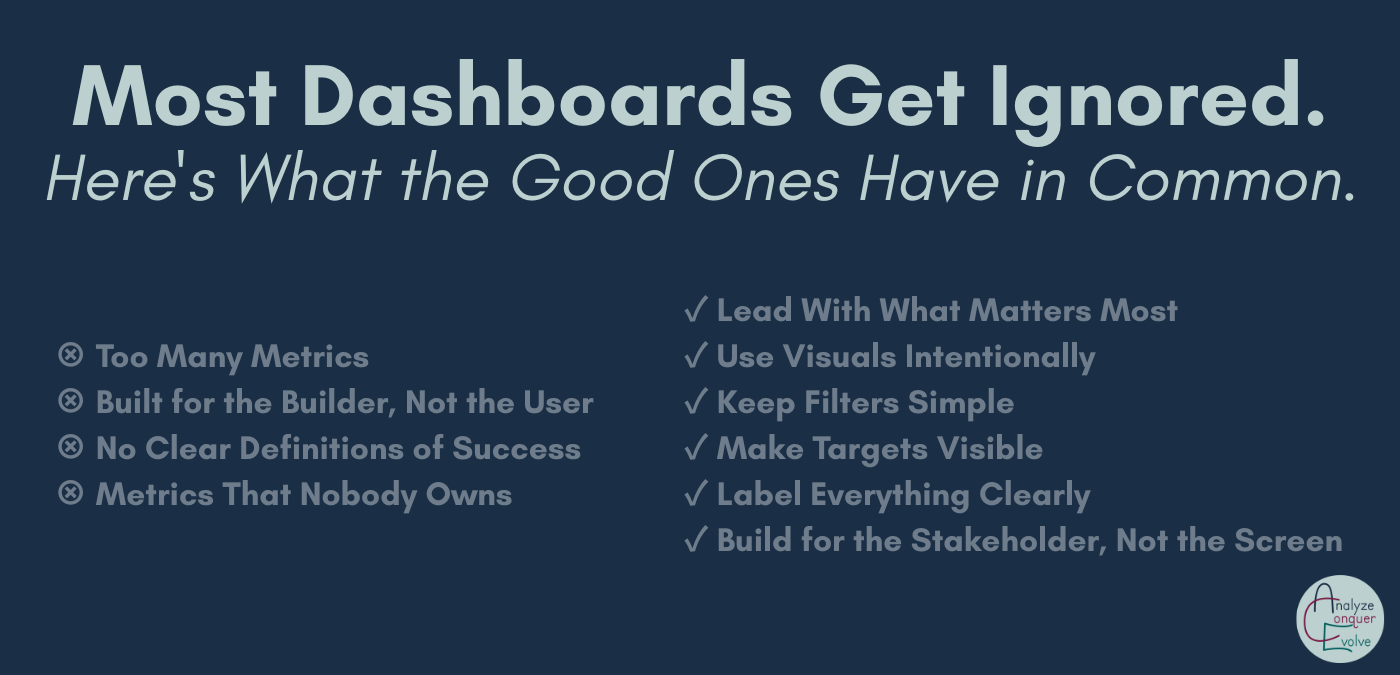
1. Displaying Too Many Metrics
More is not better; more is almost always worse. When a dashboard attempts to track everything, it communicates nothing. Users become overwhelmed, unable to decipher what to prioritize. A valuable dashboard is opinionated. It highlights the few metrics that directly govern the target decision and deliberately excludes everything else. If five departments need five different perspectives, build five tailored views rather than one monolithic dashboard with forty filter menus.
2. Designing for the Builder Instead of the User
Data teams spend all day inside data structures. Consequently, they often organize dashboards in ways that reflect the underlying data models rather than how the business operator thinks. A sales director does not care about your warehouse joins or normalized schemas; they care about pipeline conversion and rep pacing. Spend time observing end users before building. What numbers do they check during Monday standups? What questions require manual spreadsheet calculations today? Those conversations define your layout.
3. Launching Without a Definition of Success
Before launching a dashboard, establish clear success criteria: What operational decision will occur faster because this asset exists? What manual reports will be retired? Schedule a mandatory 30-day review post-launch to audit usage and interview stakeholders. Dashboard development does not finish at release; launch is merely the start of the feedback loop.
4. Populating Metrics That Nobody Owns
Every single KPI on a dashboard must have a designated human owner: someone accountable for monitoring the metric and authorized to act when it trends off course. Unowned numbers quickly become decorative wallpaper. If you cannot identify who owns a metric and what operational levers they will pull when it changes, that metric does not belong on the screen.
Design Principles That Actually Drive Clarity
Effective design is about usability, not visual flash:
- Lead with visual hierarchy: Place the primary executive KPI in the top-left position. Do not force users to scroll past secondary tables to find the core health indicator.
- Select charts intentionally: Bar charts excel at discrete comparisons; line charts communicate trends over time; single large number callouts work best for immediate focal points. Avoid pie charts and nested donut charts, which obscure relative scale.
- Streamline filter controls: Provide only the essential dimensions (such as date range and region) that alter decisions. Twenty dropdown filters create confusion.
- Anchor numbers to visible targets: Always display target thresholds, previous period comparisons, or budget benchmarks alongside actuals.
- Label with plain-language definitions: Include brief, non-technical tooltips explaining how the metric is calculated so non-analysts feel confident using the data.
Build for the Stakeholder, Not the Screen
Know your audience. An executive view requires high-level summaries, directional trends, and clear indicators of whether goals are on track. They do not want to scroll through thousands of rows of transaction logs.
Conversely, for operational audit teams or finance managers, a detailed, filterable tabular view is often the exact right tool. Forcing tabular workflows into stylized graphics for the sake of looking modern often impedes everyday execution. Adapt your layout to the user's cognitive workflow.
The Fundamental Question: Do You Even Need a Dashboard?
Not every analytical problem demands a real-time BI dashboard. Frequently, the optimal solution is a scheduled weekly email summary, an automated alert triggered only when thresholds breach, or a simple spreadsheet template that empowers a team to run ad hoc modeling themselves.
Before committing engineering sprints, verify that a dashboard is the appropriate delivery mechanism. A dashboard's worth is proven solely by whether it enables better, faster business choices.